
Shoulder Pain at the Computer? Here’s a Smarter Way to Fix It

If you work at a computer, like a lot of our Milsons Point and North Sydney patients do, shoulder discomfort isn’t random. It’s predictable.
Hours of keyboard use place your body into a very specific pattern:
Head drifting forward
Upper back rounding
Shoulders internally rotated
Elbows slightly flared
Scapulae (shoulder blades) fixed and underactive
From a vitalistic perspective, this isn’t just muscular strain. It’s sustained neurological stress. Your nervous system adapts to the position you live in most. If that position is forward and compressed, your body will wire itself around it.
The solution isn’t just “sit up straight.” It’s restoring alignment, movement, and intelligent muscle activation so your shoulders can function without overload.
Let’s make this practical.
Why Your Shoulders Hurt at the Desk
When typing or using a mouse for long periods:
The chest muscles shorten.
The upper trapezius and levator scapula overwork.
The lower traps and serratus anterior underperform.
The thoracic spine stiffens.
Breathing becomes shallow.
This combination creates compression at the front of the shoulder joint and overload at the top of the shoulder and neck.
The result?
Aching at the top of the shoulder
Burning between the shoulder blades
Pinching when lifting overhead
Neck stiffness by the afternoon
The goal is not just stretching tight areas — it’s restoring balance.
Step 1: Reset Your Desk Setup
Before exercises, fix the mechanical stress.
Monitor height
Top of screen at eye level. If you look down, your shoulders will follow.
Keyboard position
Elbows at 90 degrees. Shoulders relaxed, not reaching forward.
Mouse position
Keep it close. If your arm drifts out to the side, your upper trap switches on all day.
Feet flat on the floor
If your feet dangle, your spine loses stability and shoulders compensate.
These adjustments alone can reduce 30–40% of strain.
Step 2: The 60-Second Posture Reset (Every Hour)
Don’t wait until you’re sore.
Every 60 minutes:
Sit tall — grow upward, not rigid.
Gently tuck your chin.
Lift your sternum slightly.
Roll shoulders up, back, and down once.
Take 3 slow nasal breaths expanding your lower ribs.
This resets spinal stacking and reduces nervous system tension.
Small corrections done frequently beat long workouts done rarely.
Step 3: Activate What’s Weak
A. Seated Scapular Set
Sit upright.
Without lifting shoulders, gently pull shoulder blades down and slightly back.
Hold 5 seconds.
Repeat 5 times.
This trains lower trapezius activation — critical for pain reduction.
B. Desk Serratus Press
Place hands on desk.
Keep elbows straight.
Push through your palms to gently spread shoulder blades.
Hold 3 seconds.
10 reps.
This activates serratus anterior — your shoulder’s stability muscle.
When serratus is weak, the top of the shoulder overworks and becomes painful.
C. Thoracic Extension Reset
Sit at edge of chair.
Interlace fingers behind head.
Gently extend upper back over chair.
Look up slightly.
5–8 slow reps.
This reverses the flexed computer posture and restores joint mobility.
Step 4: Open the Front of the Shoulder
Tight chest muscles keep pulling you forward.
Stand in a doorway:
Elbow at 90°.
Step forward gently.
Feel stretch across chest.
Hold 30 seconds each side.
Do not crank the stretch. Breathe into it.
Mobility allows strength to hold better alignment.
Step 5: Improve Your Breathing
When stressed at work, breathing shifts high into the chest. This keeps neck and shoulder muscles switched on.
Try this between emails:
One hand on ribs.
Inhale through nose.
Expand ribs sideways and back.
Exhale slowly for 5 seconds.
Do 5 breaths.
Better breathing reduces muscular guarding — which often feels like “tight shoulders.”
Step 6: Understand the Vitalistic Link
Your shoulder pain is not just mechanical wear and tear.
When spinal segments lose optimal movement, neural input to surrounding muscles changes. Some muscles over-fire. Others underperform. The body creates compensation.
Chiropractic care focuses on restoring joint motion and reducing interference in the nervous system so muscles can coordinate more efficiently.
When spinal alignment improves:
Scapular control improves.
Muscle firing becomes more balanced.
Pain decreases without constant stretching.
Exercises reinforce that change.
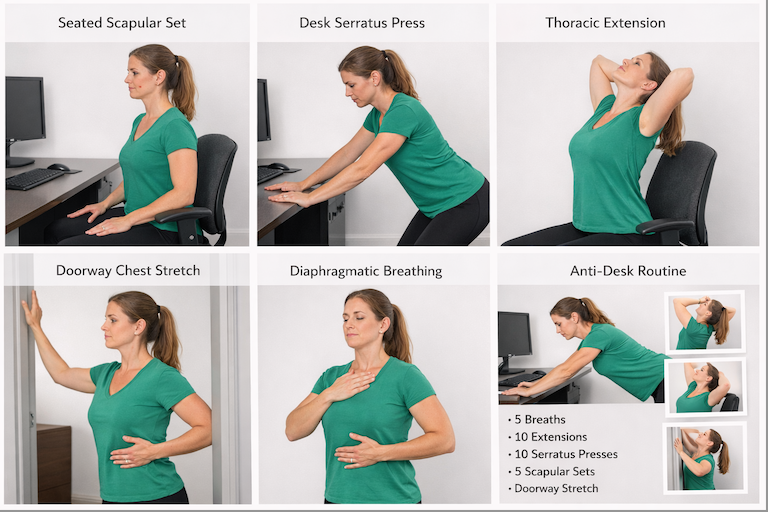
A 5-Minute Daily Anti-Desk Routine
Morning or evening:
5 diaphragmatic breaths
10 thoracic extensions
10 serratus presses
5 scapular sets (5-second hold)
30-second doorway stretch each side
Consistency matters more than intensity.
The Bigger Picture
You don’t need to quit your job or avoid computers.
You need:
Better spinal positioning
Frequent micro-resets
Correct muscle activation
Reduced neurological stress (chiropractic adjustments are great for this!!!)
Shoulder pain is a signal — not a life sentence.
When your spine is aligned and your shoulder blades move the way they’re designed to, computer work stops feeling like damage and starts feeling manageable.
Alignment creates resilience.
And resilience reduces pain.
If your shoulder discomfort persists despite doing these resets, it may be time to assess how well your spine is moving and how your nervous system is adapting to daily load.
Your body is intelligent.
It just needs the right inputs.